Equipment adoption
Most of our equipments are from the Ubiquity brand Unifi. It allows us to have every Wi-Fi related equipment under control with the Unifi controller. Before using an equipment it needs to be “adopted” by the Unifi controller.
Prerequisite
- 1 DCC or any other equipment controlled by an Unifi Controller
- 1 Unifi equipment to adopt
As an example in this tutorial we will use a DCC and an Unifi AP HD antenna.
Steps
First you need to connect to the Unifi controller via https://10.0.0.100:8443 and enter the usual credentials. Once connected go the equipment page located on the left side menu.
The equipment to adopt should be on the list with a status: Managed by another controller
In the top right corner you can click on the three vertical dots to arrange / add filters
If the equipment is brand new or has been reset then it should have Waiting for adoption status
Once you click on the equipment you should have a panel as below on the right side
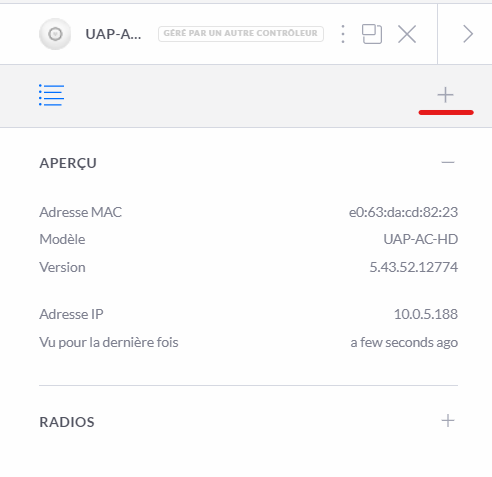
Click on the ➕ icon, so you can access to the advanced adoption menu
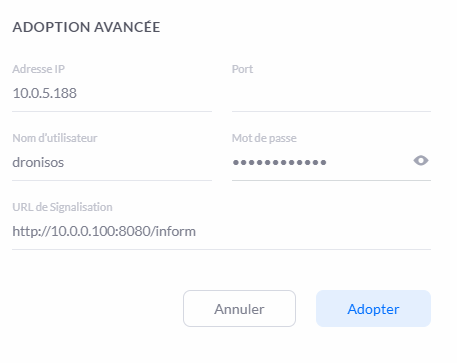
Enter the credentials then click on the adopt button. After few minutes the antenna should have the connected status on the equipment list, adoption completed.
If the adoption has failed don't hesitate to retry. If after a few attempts the adoption is still unsuccessful, reset the antenna.