How to repair a GPS UNKNOWN drone
caution
This method is for advanced users only. Please make sure to know what you are doing.
When a drone GPS status is UNKNOWN, it's possible that the drone is currently is carpet mode.
Prerequisites
- x Drones with unknown gps status
- 1 DCC
- 1 Operation laptop
- 1 Outdoor bundle loaded on the DCC
info
To ensure that you have an outdoor bundle, the GPS sensor should be enabled in the security.xml file as follows: <Sensor name="GPS" enabled="true"/>
Steps
Once the bundle is uploaded to the dcc follow these steps:
- Select all the drones that has UNKNOWN as a GPS status
- Click on the wheel icon on the bottom right
- Select the option from name
- Select the bundle
- Select all drones
- Check the
rename if necessaryoption - Click on Launch
- Once the drones are in a need reset state, reset them.
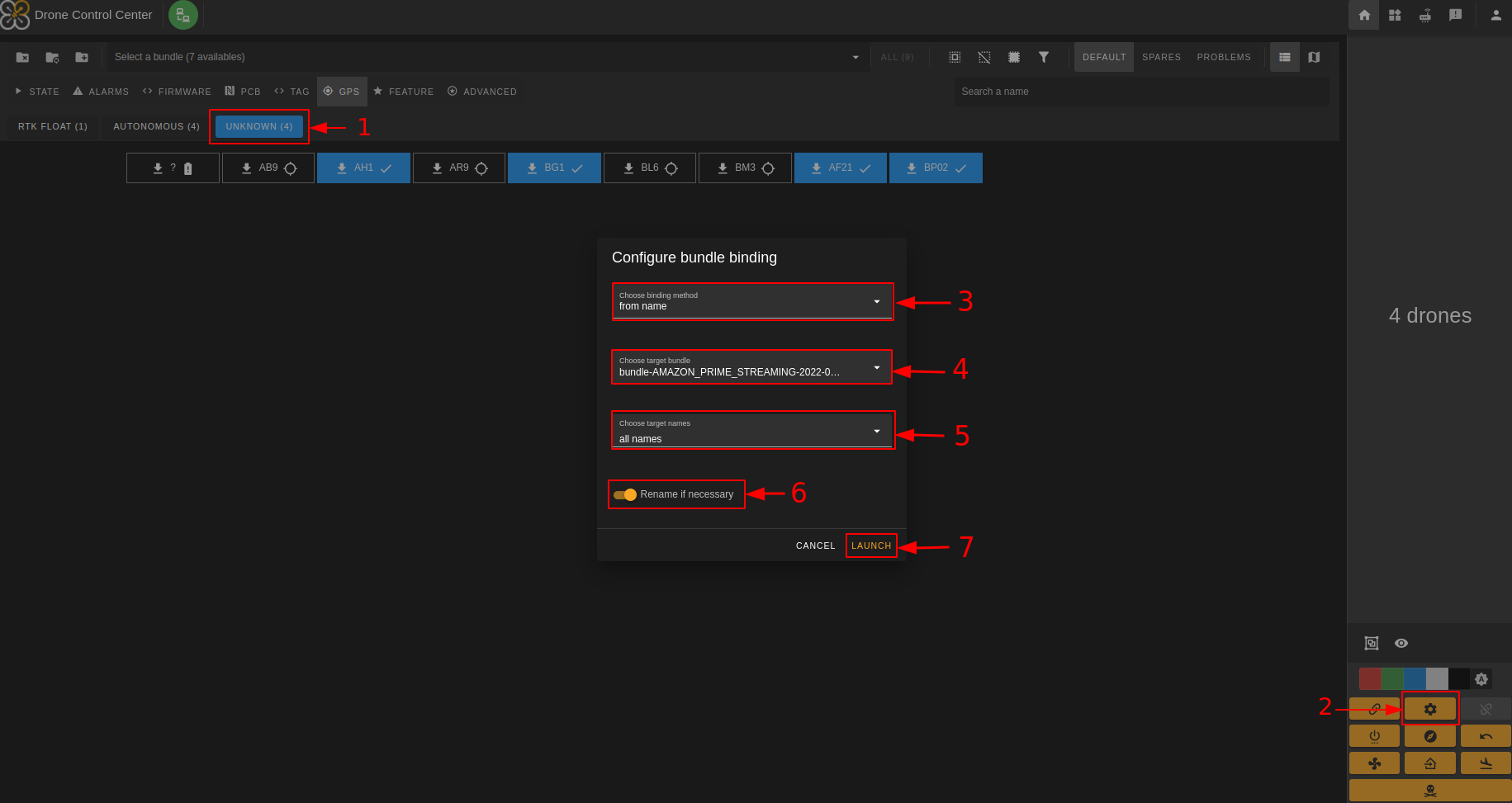
Once the drones are bound, you need to send the security.xml file:
- Select all the drones that have an UNKNOWN GPS status
- Click on the Upload all files button
- Reset the drones
The GPS statuses should now get back to working condition. If that's not the case, send the drone to maintenance.