Start zone
Every start zone will be different. This depends on the project, the number of drones, the available space, the choreography etc.
Family concept
Every start zone is created using families of drones. A family of drone is a smaller group of drone having the same name prefix (A1, A2, A3...). These families are usually composed of 9 drones but that's not always the case.
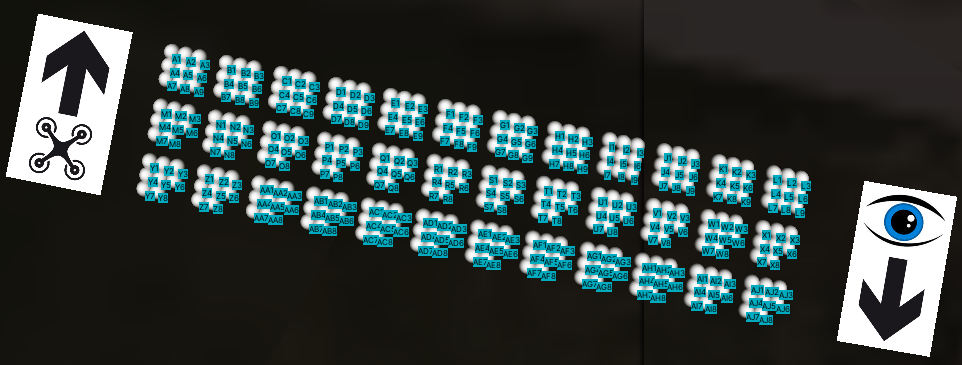
On this example, we can see that this start zone composed of 250 drones is composed of 36 families of 9 or 8 drones. The orientation of the start zone will need to be the same in-between the choreography and in reality. The drone icon with the arrow denotes the orientation that the drones will need to have in reality. The eye icon with the arrow denotes the POV of the public that was considered during the creation of the choreography.
Drawing the start zone
Following the start zone sent by the choreographer, the team will have to recreate it in real life. The family size, the distance in-between them, the orientation of the start zone needs to be as close as possible to the information sent by the choreographer and are all important to ensure the best result. To check that there isn't any difference, the choreographer can give the team the name of the drones that are placed at the extremes of the start zone. For example, in the previous capture, these would be A1, L3, Y7 and AJ6. When this information is known, place drones on these position and perform a partial setup on the DCC (please refer to Setup). On the DCC map, the choreography start zone can then be compared to the one in reality. The grid can then be drawn on the ground (depending on the nature of the surface) and marks can be placed.