Drones Configurations
Most of the available drones configuration can be changed using the security.xml file.
This file describes the security measures, their limits and threshold as well as configuration related to the PCB and the LoRa systems.
Because the security.xml file describes the geofence geometry, it can't be shared in-between choreographies if the flight box has changed.
Alarms thresholds
Changing values in the security.xml can lead to safety problems if done incorrectly. Make sure to know what you are doing before doing so. If unsure, please ask the support team.
Battery threshold configuration
The Battery tag can contain the following attributes:
| Attribute | Description | Value type | Value unit | Possible value |
|---|---|---|---|---|
lowPercentageThreshold | if the drone battery percentage attains this threshold, the drone will raise a LOW_BATTERY alarm | Integer | Battery percentage | [0;100] |
criticalPercentageThreshold | if the drone battery percentage attains this threshold, the drone will start an emergency landing procedure | Integer | Battery percentage | [0;100] |
<Battery lowPercentageThreshold="10" criticalPercentageThreshold="3"/>
WIFI_FENCING configuration
The WifiFencing tag (located in Config > Security > Fencing) contains the following attributes:
| Attribute | Description | Value type | Value Unit | Possible value |
|---|---|---|---|---|
enabled | determines if the WIFI_FENCING mechanism is enabled or not. | Integer | N/A | [0;1] |
keepAliveTimeOut | determines the amount of time in-between the loss of communication and the raising of the WIFI_FENCING alarm. If set to 0, deactivates the alarm. | Integer | Seconds | [0;∞] |
Example:
<WifiFencing enabled="true" keepAliveTimeOut="45"/>
MOBILE_FENCING configuration
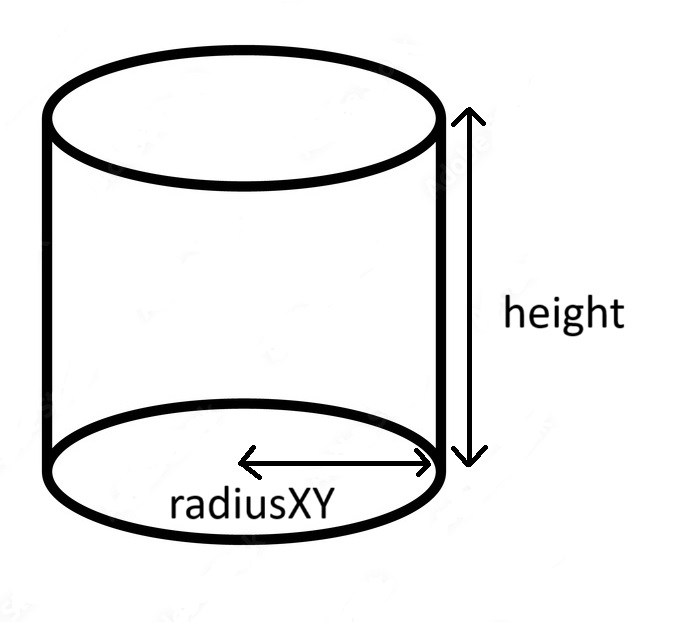
The MobileZone tag (located in Config > Security > Fencing) contains the following attributes:
| Attribute | Description | Value type | Value Unit | Possible value |
|---|---|---|---|---|
radiusXY | radius of the 3D cylinder in which the drone shall always be. For example, if set to 20, the drone position offset can be as high as 40m | Integer | Meters | [0;∞] |
height | height of the 3D cylinder in which the drone shall always be. For example, if set to 20, the drone position offset can be as high as 10m. | Integer | Meters | [0;∞] |
covarianceMax | max value after which the estimation of the captors is determined to be too poor. | Integer | N/A | [0;∞] |
Example:
<MobileZone radiusXY="10" height="20" covarianceMax="4"/>
GEOFENCING configuration
The geofencing geometry is automatically exported in the security.xml by Symfony in multiple SafeZone tags (located in Config > Security > Fencing > SafeZones).
These tags aren't meant to be manually changed.
However, the KillZoneGap tag is available to create a second geofencing box.
If the drone hits the first geofence (.ie the one described by Symfony) the drone will perform an RTH or LAND depending on the conditions.
If the drone hits the second geofence (.ie the box described by Symfony + the gap described by the KillZoneGap gap), the drone will KILL.
For the KillZoneGap tag, the following attributes are available:
| Attribute | Description | Value type | Value Unit | Possible value |
|---|---|---|---|---|
gap | distance in-between the first and second geofence. Setting this to zero means that every drone hitting the geofence will be killed. | Integer | Meters | [0;∞] |
Example:
<KillZoneGap gap="10"/>
BAD_START_POST configuration
The StartPosition tag (located in Config > Security) contains the following attributes:
| Attribute | Description | Value type | Value Unit | Possible value |
|---|---|---|---|---|
acceptance | Max distance in-between the current estimated position and the choreography start position after which the drone will raise the BAD_START_POSITION alarm | Integer | Meters | [0;∞] |
<StartPosition acceptance="2"/>
NO_UWB_DATA configuration
The Uwb tag (located in Config > Security) contains the following attributes:
| Attribute | Description | Value type | Value Unit | Possible value |
|---|---|---|---|---|
timeout | Determines the amount of time in-between the loss of communication and the raising of the NO_UWB_DATA alarm. If set to 0, deactivates the alarm. | Integer | seconds | [0;∞] |
<Uwb timeout="10"/>
Changing the RTH behavior
Please refer to the TODO BUNDLE TWEAKER page to do so
Activate/Deactivate the startup LED sequence
When a battery is plugged in the drones, they will automatically perform a LED sequence (Red then Green then Blue for Zephyrs, Helios will also light up in White).
This behavior can be deactivated if needed using the OmniDrone tag with the following attributes:
| Attribute | Description | Value type | Value Unit | Possible value |
|---|---|---|---|---|
ledStartSequence | Determines if the LED startup sequence in played or not. 1 to activate, 0 to deactivate. | Integer | N/A | [0;1] |
Example:
<OmniDrone ledStartSequence="0"/>
Please note that the new configuration will be applied after a reset.
The Helios drones do not have any other means of communicating that they are powered on if the start-up sequence is deactivated. Let the helpers know !
Configure the light intensity of the alarms
When a drone raise an alarm (regardless of in-flight or not), the default behavior is to let the operator know by switching its LED color to a known shade.
To change this behavior, the Alarms tag is available with the following attributes:
| Attribute | Description | Value type | Value Unit | Possible value |
|---|---|---|---|---|
groundLedIntensity | Determines the intensity of the alarm automatic LED while on the ground. Set to 0 to disable these while on the ground. | Integer | Percentage | [0;100] |
flyingLedIntensity | Determines the intensity of the alarm automatic LED while in flight. Set to 0 to disable these while in flight. | Integer | Percentage | [0;100] |
Please note that setting flyingLedIntensity attribute to something else than 0 means that the drone LED choreography will be overridden if an alarm is raised by the drone during the flight !
Pyrotechnics configuration
Pyrotechnics drones behavior can be modified using the Fireworks tag, available with the following attributes:
| Attribute | Description | Value type | Value Unit | Possible value |
|---|---|---|---|---|
minAltitude | Altitude under which the pyrotechnics cannot be triggered | Integer | Meters | [0;∞] |
<Fireworks minAltitude="2"/>
The OmniDrone tag is also available with the following attributes:
| Attribute | Description | Value type | Value Unit | Possible values |
|---|---|---|---|---|
fireworksMode | Determines the mode used when the pyrotechnics will be triggered. | String | N/A | - FireOnly: the pyrotechnics will be launched, the LED won't be overridden - LedOnly: the pyrotechnics won't be launched, the LED will be overridden - FireAndLed: the pyrotechnics will be launched, the LED will be overridden |
<OmniDrone fireworksMode="FireOnly"/>
More information regarding pyrotechnics can be found Pyrotechnics
LoRa Configuration
The drones LoRa configuration can also be set using the security.xml, to do so please refer to TODO BUNDLE LORA