Package Dublin
Welcome to our latest update!
We're excited to unveil a series of enhancements in the DCC frontend, now including support for basic start zone rotations during setup.
For Zephyr drones, no major changes are visible, but we have refined the LED management and increased data collection. This will help us better understand and solve the various LED-related issues observed during shows, thus ensuring smoother and more reliable performances.
🚥 Status Bar
We've added a status bar to help you keep track of devices connected to the DCC.
Now, when you connect the RTK base or the Deadman to the DCC, a small icon will appear in the top right corner to show you what's happening.
It's like having a little personal assistant keeping you informed!

🛠️ Simplified Setup
We've broken down the setup process into small, easy-to-follow steps.
No more confusion, just a clear and simple setup. We know your time is valuable, so we've made things quicker and less complicated.
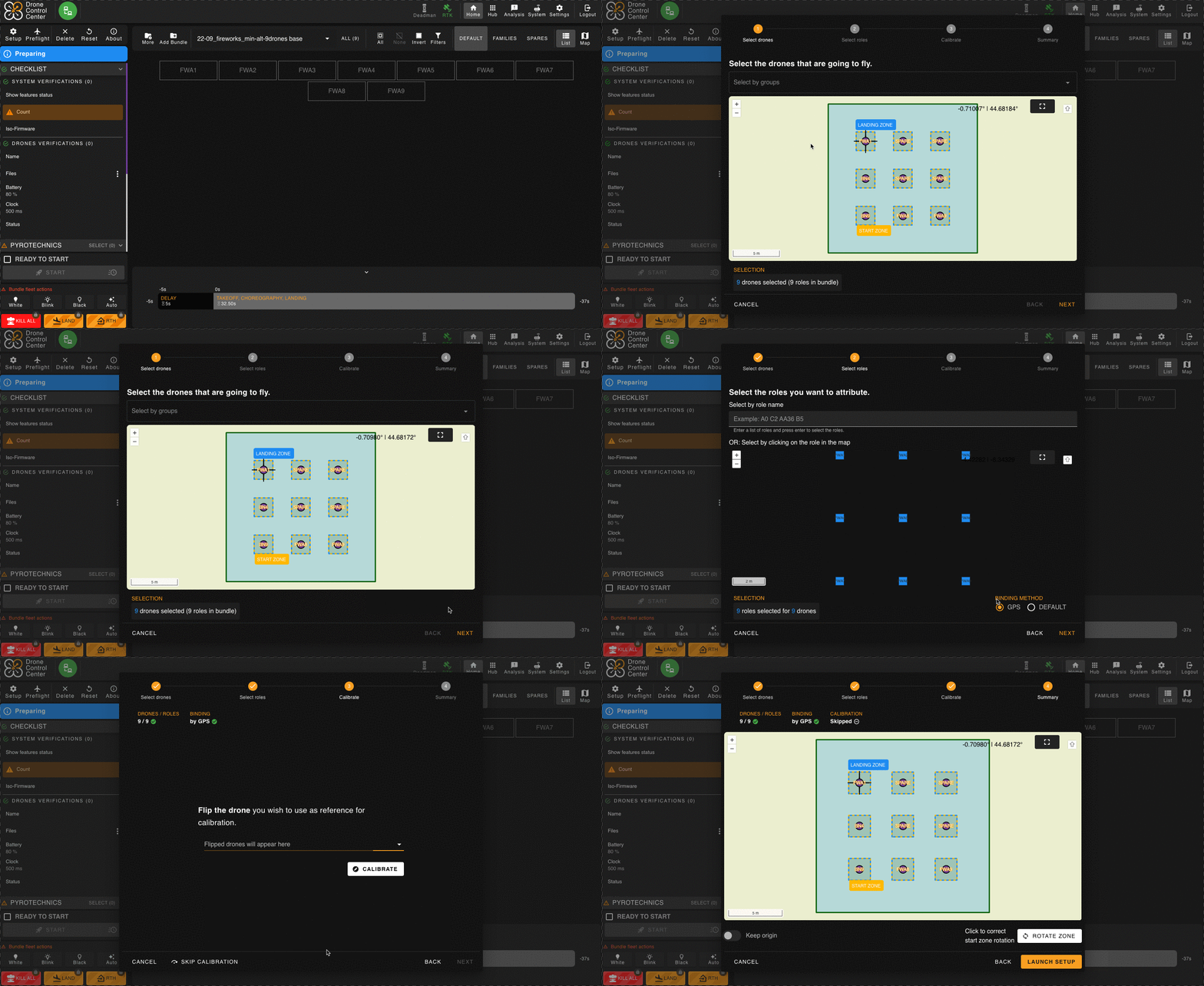
🔁 Startzone Rotation (Beta Version)
Here's something exciting: you can now rotate the startzone during setup.
This feature is still in Beta, so there are a few small details to keep in mind!
- The rotation is limited to 15° (not bad, right?).
- For now, this rotation only applies to the startzone. The landing and RTH zones will have to wait a bit longer.
- A little tip: if your drones have LEDs during the first 30s of the show, including takeoff, it's better to avoid using this function for now.
- Make sure your drones are properly aligned with the startzone's rotation. If the zone rotates by 10°, your drones should do the same.
- Takeoffs in your show must last at least 4 seconds – give your drones time to shine!
- And even if you do a partial setup, all drone trajectories will follow the rotation.
⏱️ Enhanced Timeline
We've revamped the Timeline interface to provide more details, such as the duration of takeoff and landing phases, as well as key moments for the LEDs.
This version is just the beginning; more improvements are on the way to enhance your operational experience.

🔐 Enhanced Security Measures
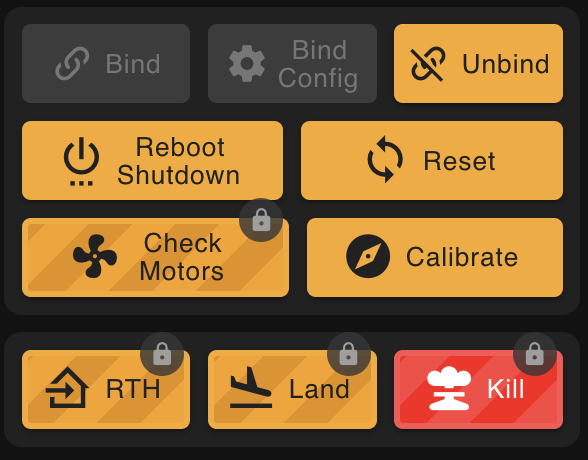
For specific critical actions such as Return to Home (RTH), Land, Kill, or Check Motors, an additional layer of security has been implemented. To activate these actions, you must press the CTRL key simultaneously while clicking the respective buttons. This measure prevents unintended interactions, ensuring you have precise control over these vital functions, enhancing your overall operational safety.

🚀 Other Improvements
Zephyr
- When free-fall recovery is activated on Zephyr (Bebop) drones, after a recovery, the drone will try to use the nearest available intelligent RTH (Return to Home) path.
- The stability of the Zephyr drone has been improved.
- Flat trim parameter is now enabled by default for normal flights. This operation is now only performed during preflights.
WiFi
- The default value for WiFi Fencing has been increased from 45 seconds to 200 seconds.
DCC
- Basic and advanced bundle information is now available once the bundle is loaded into the DCC, accessible by clicking on the ℹ️ of Bundle panel.
- The left and right panels of the DCC have been improved to contain a better-organized set of information.
- A new item in the checklist, “Show Feature Status,” indicates whether the choreography is ready to execute Hot Swap and Startzone Rotation features.
- When preparing your spare drones for Hot Swap, they can now be oriented in the same direction as the drones in the choreography.
🐞 Bug fixes
- The operation of the LEDs on Zephyr (Bebop) drones has been revised to reduce LED issues during shows. If the problem persists, we will have more details in the Blackbox for diagnostics.